
Example · churn · public data
How to Build a Churn Prediction Model Without a Data Scientist (Worked Example)
Save revenue before it leaves
Export one row per customer with what you knew about them and whether they churned within a set window, train a model on it, and judge it by how many churners it catches on customers it never saw, not by accuracy. Below, we do exactly that on the public IBM Telco Customer Churn dataset, step by step.
Last updated · Published
00 · Define
Decide what churn means and when you predict it
Pick one definition and one prediction window, for example a customer who cancels or does not renew within 90 days. Then pick an as-of date: each row describes the customer as of that date, and the label says whether they churned in the window after it. Anything that happened after the as-of date stays out of the row, or the model learns from the future. In the dataset below, churn means the customer left within the last month.
Do you need a model at all?
With a few dozen accounts, or only a handful of customers who ever churned, a rule-based health score is enough: flag falling usage, late invoices, or a month-to-month contract coming up for renewal. A trained model beats it once you have a few hundred customers with churners among them, because it weighs every signal at once and shows how well it ranks customers it has never seen.
01 · Data
Start with customer history you can see
Public telecom records from the IBM Telco Customer Churn dataset, 7,043 customers. One row per customer: tenure, services, billing, and outcomes. Same shape as a CRM or billing export.
| Contract | Internet | Tenure | Monthly | Churn |
|---|---|---|---|---|
| One year | Fiber optic | 9 mo | $65.6 | No |
| Month-to-month | Fiber optic | 13 mo | $98 | Yes |
| Month-to-month | Fiber optic | 3 mo | $83.9 | Yes |
| Two year | DSL | 58 mo | $78.35 | No |
| Month-to-month | Fiber optic | 18 mo | $78.2 | No |
02 · Target
Highlight what we want to protect
The Churn column is the label: the outcome we already know from the past. That is the revenue signal. Everything else is context the model can use before a customer is gone.
Target label
Churn = Yes / No
Predict Yes early enough that retention can still save the account, and the revenue attached to it.
03 · First model
Train a baseline model on the natural mix
EasyDeploy searches pipelines on the raw training data and keeps a strong performer. Fast to get a first screener with a real pipeline, report, and holdout scores.
04 · Errors
Notice what the baseline misses
Accuracy can look fine while the model still misses nearly half of real churners. Those misses are revenue that was about to be lost and never made the save list. The training mix was skewed toward customers who stayed, so the model learned the majority class too well.
Missed churners on holdout
48%
Almost 1 in 2 at-risk customers never reached retention.
Training class mix
~2.8 stayed : 1 churned
Rare outcomes get under-learned unless you rebalance training.
05 · Rebalance
Balance classes, then train again
Rebalance training so churn and retained customers are equally represented. Keep the holdout in the real-world mix so the score stays honest. EasyDeploy runs a second search and returns another production-ready model quickly.
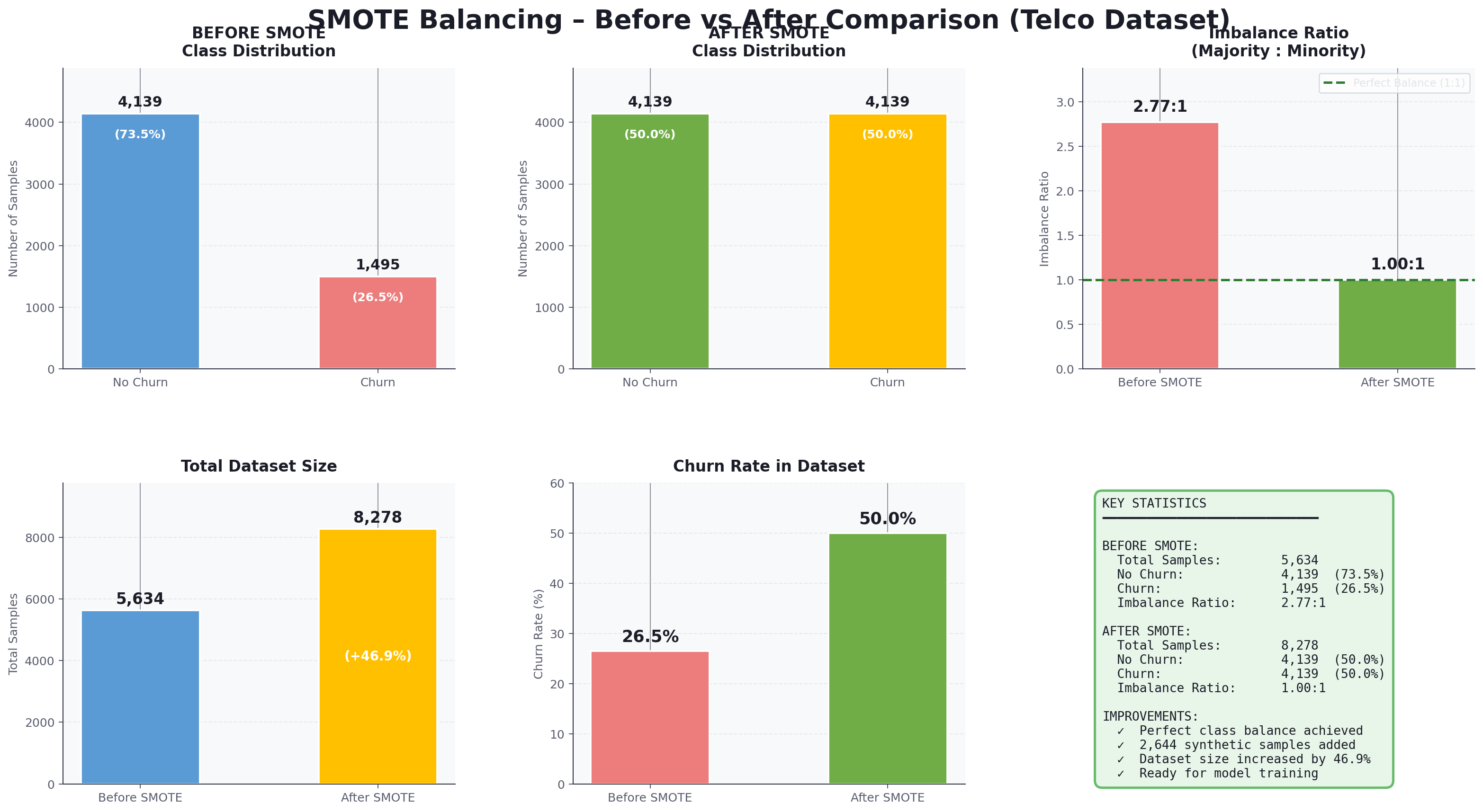
Before: 4,139 stayed vs 1,495 churned. After balancing training: 1:1. Holdout stays unbalanced on purpose.
Missed churners now
17%
Same untouched holdout. Far more at-risk revenue makes the save list.
06 · Use both
Match the screener to the save motion
Both models are useful. Pair each ranked list with a different technique so spend and effort track how sure you are that revenue is about to leave.
Precision lane · baseline
High-certainty saves
Misses more churners (48%), but when it flags an account, confidence is higher. Reserve this list for promotions, discounts, or other costly interventions when you are very sure revenue is about to be lost.
Best when a false alarm wastes real budget.
Coverage lane · rebalanced
Wider early outreach
Catches more at-risk revenue (17% misses). Use this broader list for light check-ins: a status call, a success touchpoint, or a simple how-are-things outreach before anyone needs a heavy save offer.
Best when an extra check-in is cheap compared with losing the account.
Try it on your revenue at risk
Bring a labeled CSV. Train a baseline, catch the miss pattern, rebalance, train again, then route both screeners so your team can save revenue before it is lost.