
TL;DR
You can build HubSpot's $3,600-a-month lead scoring yourself: your CRM, the AI assistant you already pay for, and a model fitted to your own deals.
A rep works the top 100 of each list. Filled dots converted.
A hand-built engagement score, from a public dataset
23 fewer than random
16
Picking leads at random
the baseline
39
A model fitted to the same data
53 more than random
92
- A rubric is not a prediction. Thirty points for revenue over $5M is a guess somebody typed into a box. A prediction is a weight fitted to the deals you actually won and lost.
- HubSpot and Salesforce got the design right: fit on one axis, engagement on the other, four quadrants, four actions. Keep the grid. Only the numbers are wrong.
Where I am coming from
We make EasyDeploy AI, which sells one layer of what follows: the model. We do not sell the CRM or the assistant, and the argument below is partly why you should not buy them bundled. Every HubSpot price here is from HubSpot's published pricing page, read on 1 October 2026.
The points are guesses
Open the lead scoring builder in any CRM that sells one and you get the same screen: pick a property, pick a comparison, type a number of points into a box. Agencies publish baselines to fill the boxes with. Revenue over $5M, 30 points. A director title, 25. Two pricing page views, 20. A demo request, 50.
Where did 30 come from? Not from your closed deals, because whoever wrote the baseline has never seen them. The numbers are taste and pattern-matching across other companies, dressed up as configuration. The product will compute a score from them either way.
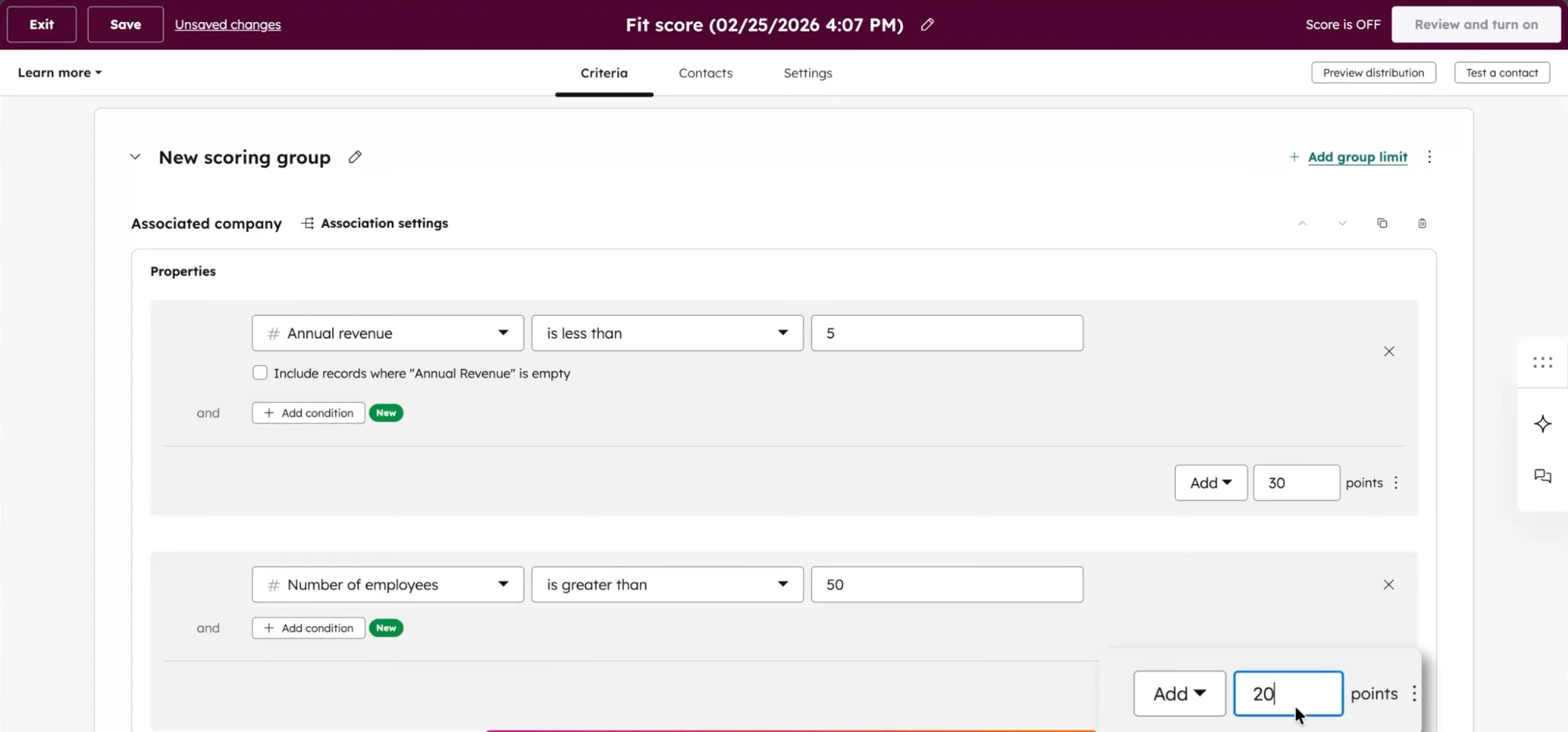
A rubric will score every lead you have, confidently, whether or not its weights predict anything. It cannot tell you which.
The grid is right. The numbers are not.
Here is the part the incumbents got right, and it matters because it is the part you should keep. When HubSpot retired its single score property on 31 August 2025 and split it into a fit score and an engagement score, it fixed a real problem. Under one score, a student who downloads five ebooks outranks a VP who looked at your pricing page once. Two axes give you four quadrants, and each quadrant is a different thing for your team to do.
A rubric places a lead on this grid by adding up points you typed in. A prediction places it with weights fitted to the leads you already won and lost. Hand the model those outcomes and it works out what each signal was worth: revenue over $5M might be worth a lot, nothing, or less than one pricing page visit. You find out instead of deciding.
Fitting also catches what addition cannot. A VP title next to a pricing visit can mean more than the two added together. A lead who went quiet three weeks ago is dead in a three-week sales cycle and warm in a nine-month one. A points table has no row for either. A model learns both from your data without being asked.
What the HubSpot bundle costs
Lead scoring is not available on Free or Starter at all. Prices as published by HubSpot in October 2026.
| Tier | Price | Lead scoring |
|---|---|---|
| Marketing Hub Free | $0, up to 2 users | Not available |
| Marketing Hub Starter | $20/mo per seat, or $7 on a promotional rate for new customers only | Not available |
| Sales Hub Professional | About $100/mo per seat, no seat minimum, plus a one-time $1,500 onboarding fee | Up to 5 hand-built scores |
| Marketing Hub Professional | $890/mo, or $800/mo billed annually. 3 core seats and 2,000 marketing contacts. Plus a one-time $3,000 onboarding fee HubSpot lists as required | Up to 5 hand-built scores |
| Marketing Hub Enterprise | $3,600/mo. 5 core seats and 10,000 marketing contacts. Plus a one-time $7,000 onboarding fee HubSpot lists as required | Up to 50 scores, and the only tier with AI recommendations |
Put plainly: you can rent the grid for about $100 a seat, and the tier where HubSpot fits the numbers for you starts at $3,600 a month. Professional gives you up to five scores whose point values you type in yourself. AI recommendations appear on exactly one line of the pricing page, next to Enterprise and its $7,000 onboarding fee.
The assistant layer is metered on top. Credits cost $0.01 each, a Data Agent response is 10 credits per record, and the Prospecting Agent is 100 credits, a dollar, for every lead it recommends. A dollar a lead scales with your pipeline, so a good quarter arrives as a bigger invoice.
What a hand-built score actually scored
Rather than build a rubric and grade our own homework, we went looking for one somebody else had built. A public dataset of 9,240 inbound leads carries exactly that: a profile score and an activity score assigned to each lead, sitting next to whether the lead converted. Whose scheme it was is undocumented, and we are not going to guess. It is a hand-built two-axis score of the shape this article is about, which is a rare thing to find in the open.
We held back a quarter of the leads, kept the 1,238 carrying both scores, and asked one question. If a rep worked the top 100 of each ranked list, how many would convert? Base conversion is 39.2%, so a list in random order gets you about 39.
| How the list was ranked | AUC | Converters in the top 100 |
|---|---|---|
| The existing profile score, their fit axis | 0.624 | 72.9% |
| The existing activity score, their engagement axis | 0.641 | 15.7% |
| Both existing scores combined | 0.677 | 74.4% |
| A model fitted to the same raw intake data | 0.859 | 92.0% |
| Calling leads at random | 0.500 | 39.2% |
The hundred leads their engagement score called hottest converted at 15.7%. A hundred leads picked at random converted at 39.2%.
The engagement score was not weak. It was backwards. Leads it labelled high activity converted at 29.8%. Leads it labelled medium converted at 42.5%. A rep working that list from the top did worse than a rep working it in no order, and nothing about a number between 1 and 20 says so. Its AUC was 0.641, the kind of figure that survives a quarterly review. The same trap caught an 80% accurate churn model that missed half the customers who left.
Fit did real work: 73 converters in a top 100 against a base of 39. Adding engagement moved that to 74, so half the system was carrying the other half. The model, given the same raw fields and no human judgement, found 92. The information was in the data the whole time. The typed-in weights failed to extract it.
What the run cost
One training credit of the five on the free tier, sixteen and a half minutes, and 2,310 predictions of the 100,000 included. No credit card. The platform chose its own pipeline. Its report put time on the website at 29% of the model's importance, last activity at 20% and lead source at 19%: half the predictive power in three fields, none of them a point value anyone typed in.
How to check our work
The data is the Lead Scoring Dataset on Kaggle: 9,240 leads, the outcome recorded for every one. Three caveats: a figure computed over 100 rows carries a few points of sampling error; the existing score was missing for 45.6% of leads, so we compared only where it was present; and these are inbound signups for a consumer-priced product, with a far higher base rate than a B2B pipeline, so read the gaps between the rows and not the absolute numbers.
Build the Enterprise tier yourself
This is the actual bet behind our product, so we will say it plainly. The assistant layer is going to be won by Anthropic, OpenAI, Google and Microsoft, and you almost certainly already pay one of them about $20 a month. Paying a CRM vendor for a second-rate copilot metered per record, while Claude or ChatGPT sits open in the next tab, is an expensive mistake. The modelling that used to separate a large company from a small one is the part that got cheap. What is left is three layers, two of which you already have.
Bundled
Marketing Hub Enterprise, $3,600 a month plus $7,000 onboarding. The only HubSpot tier where the AI suggests the numbers instead of you typing them in.
Unbundled
The CRM and the assistant you already pay for, about $20 a month for the assistant, plus a model that is free to start.
The loop is four steps, and the assistant writes it. Export the leads whose outcome you already know, won and lost, and drop any column that only gets filled in after the outcome, because those make a model look perfect in testing and useless on a new lead. Train on that export. Then have the assistant pull new leads on a schedule, score them, write the score back to the CRM and post the top of the list where your team looks. Describe that to Claude Code, Codex, Gemini or Copilot and you have a working draft in an afternoon.
Speed is not the trade-off people assume. We scored one lead through the API the way a form handler would: 0.69 seconds, with no deployment step and no endpoint to provision. Against a five-minute speed-to-lead standard, the prediction was never the constraint. The plumbing was, and the plumbing is what the assistant now writes.
What you give up is somebody else's uptime. A bundled feature has an owner and a support queue; an automation you built has you. That is a real cost and the honest reason to buy the bundle. It is not a capability. Nothing on HubSpot's Enterprise line is something a large company can do and you cannot.
What to do on Monday
- You have won and lost deals in a CRM and no data scientist. Export them, train on the outcome, and compare the fitted weights with whatever rubric you run now. The gap is what you have been leaving on the table.
- You are on HubSpot Free or Starter. Lead scoring is not available to you at any price, so the choice is not rubric versus model. It is nothing versus a model.
- You are on Professional and the rubric is live. Keep it, run a fitted model beside it for a month, and see which list converts.
- You need the routing automated and do not want to own the plumbing. Buy the bundle. Paying for uptime is the one reason on this list that holds.
- You are not sure your data is good enough. It usually is. The readiness guide tells you in a few minutes.
A rubric produces a number for every lead whether or not it predicts anything, and it never tells you which. The only way to find out is to fit one and compare.
Frequently asked questions
What can I use instead of HubSpot's built-in lead scoring?
There are four real options. Keep a manual rubric, which is free but unvalidated. Buy the predictive add-on from your CRM vendor, which is the least work and the most expensive per record. Buy a dedicated scoring tool such as MadKudu, which now also owns Breadcrumbs, and which sits between the two. Or train a model on your own won and lost deals and own the output, which is what this article walks through. The right answer depends mostly on whether you need the score to trigger automated actions inside the CRM without a human.
Can I use my HubSpot or Salesforce data to score leads automatically?
Yes. Export your contacts or opportunities with a column recording the outcome you already know, such as whether each one became a customer, and train a model on that export. You do not need an integration to start; a CSV is enough. Scores can then be written back to the CRM on a schedule, either through its API or through an AI assistant connected to both systems.
Connect your assistant to EasyDeployHow do I move from manual lead scoring to something automated?
Start by keeping your existing rubric running, so you have something to compare against. Export the leads whose outcome you already know, won and lost. Train a model on that outcome rather than on an intermediate label like marketing qualified lead, and drop any column that only gets filled in after the outcome, because those leak. Compare the model's ranking against your rubric's ranking on leads neither has seen. If they disagree about who to call first, you now have a testable question instead of an opinion.
How do I predict which deals in my pipeline will actually close?
Train on closed opportunities rather than on leads, using won versus lost as the outcome and only the fields that were known while the deal was still open. This is the gold standard for scoring, because the label is real revenue rather than somebody's judgement that a lead looked promising. The common mistake is including fields that get updated at the moment of closing, such as a final stage or a close reason, which makes the model look near-perfect in testing and useless in production.
Which HubSpot tier do you need for lead scoring?
Professional or Enterprise, on either Marketing Hub or Sales Hub; it is not available on Free or Starter portals. The cheapest door is Sales Hub Professional at about $100 a month per seat with no seat minimum. Marketing Hub Professional is $890 a month, or $800 billed annually, with three core seats and 2,000 marketing contacts, plus a one-time $3,000 onboarding fee HubSpot lists as required and waives when a certified partner delivers it. Professional caps you at five scores whose weights you set by hand. AI recommendations and up to 50 scores are Enterprise only, which is $3,600 a month plus a $7,000 onboarding fee. HubSpot retired its older single score property on 31 August 2025, so any scoring built before then had to be rebuilt.
What is the difference between a fit score and an engagement score?
Fit measures whether a lead resembles your ideal customer, using things that change slowly: company size, revenue, industry, job title. Engagement measures whether now is the moment, using behavior: pages viewed, content downloaded, forms submitted, replies sent. Keeping them separate is useful because the two combinations of high and low imply different actions. A good-fit lead who is not engaged needs nurturing, while an engaged lead who does not fit your profile usually needs ignoring.
How much data do I need to score leads?
Fewer rows than people expect. A few hundred leads with known outcomes can produce a model worth acting on, and a few thousand is comfortable. What matters more than volume is that the outcome column is real, that you have a reasonable number of both outcomes rather than two wins out of a thousand, and that none of your columns were filled in after the outcome was decided.
Check your data with the readiness guideReady to try it on your data?
Book a strategy demo for a walkthrough scoped to your systems, or start free and train a custom model yourself. No credit card required.