
Odoo Predictive Lead Scoring: How Good Is It, and Can AI Beat It?
We tested it on 752 simulated leads, with free, open-source Odoo and no code.
By Emanuel Castañeda, Founder & CEO
October 22, 2026
Odoo's predictive lead scoring is free in Community, not just Enterprise, and in our test it found twice as many wins as calling at random. On simulated leads in Odoo 19, a model trained with EasyDeploy AI on the same CRM history ranked the leads better still. Here's how to run the same test on yours.
TL;DR
Odoo already scores your leads for free, Community edition included, and the score is decent. In our test, a model trained on the same CRM history found 12 more won deals in the first 150 calls than Odoo's default score did.
Won deals found in the first 150 calls
752 new leads, 137 of them eventually won. Each list calls its top 150.
Calling at random
the baseline
Odoo's predictive lead score
default fields, free in Community
A model trained on the same CRM history
trained with EasyDeploy AI
- We make EasyDeploy AI, which trained the model. The leads are simulated, so treat this as a worked example, not a benchmark.
- You can run the same test on your own leads from the assistant you already use. You write no code.
- Odoo Community and the connector are free and open source, and EasyDeploy AI's free tier covered the training.
Where we're coming from
We make EasyDeploy AI, which trained the model in this test. The leads are simulated: about 3,400 from a generator we wrote, for a fictional furniture company in Odoo 19 Community. The data has patterns Odoo's method can't capture, and we can't say how much of the gap that explains, so treat this as a worked example, not a benchmark.
Some AI answers say Odoo's predictive lead scoring is Enterprise-only. It isn't. It ships in the CRM app, which is part of Community, so most Odoo users already have a lead score. In our test, the first 150 calls from Odoo's list found 61 of the 137 won deals. Calling at random found 27. A model Claude trained with EasyDeploy AI on the same CRM history found 73. You can run the same test on your own leads.
How good is Odoo's lead score?
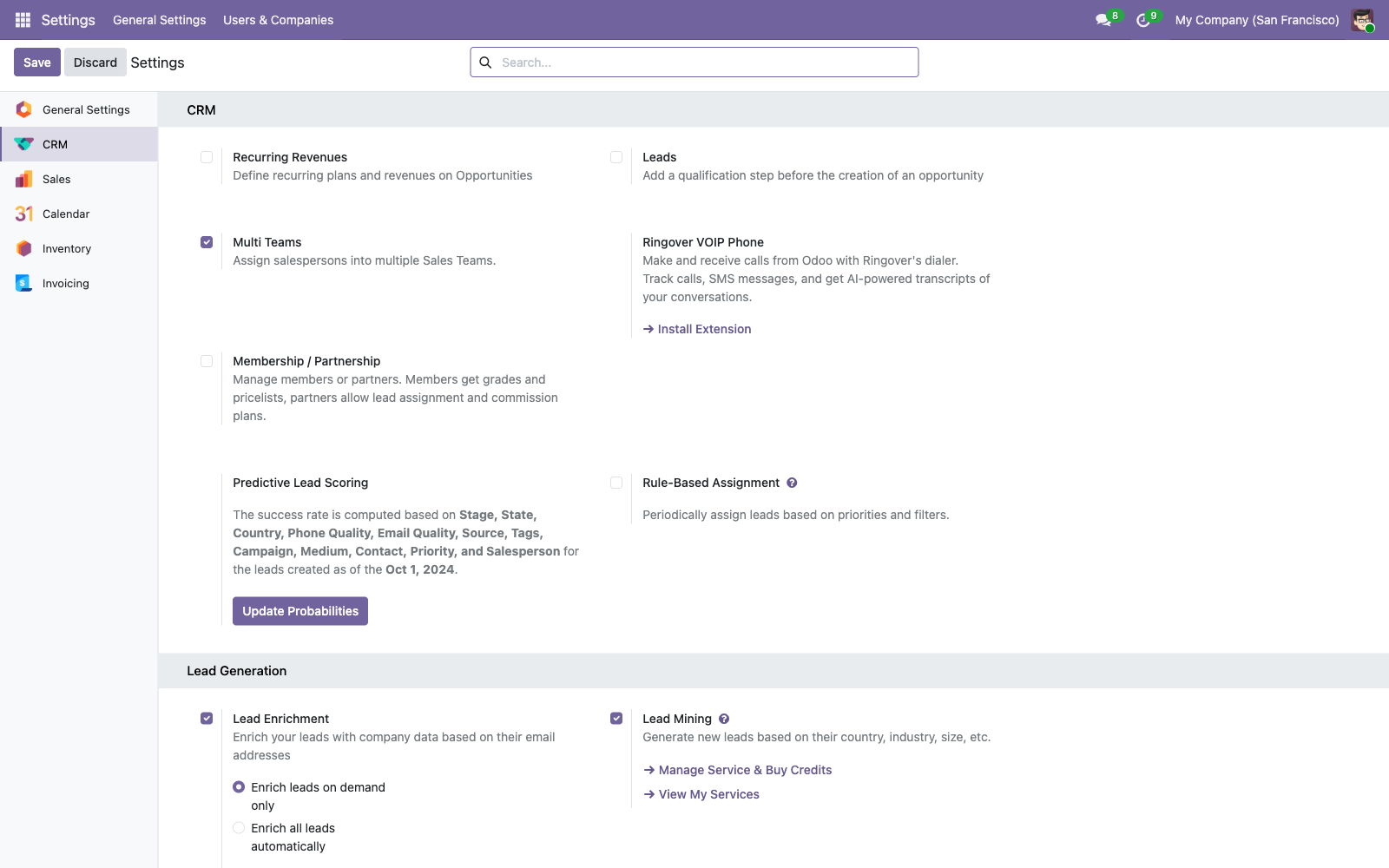
Odoo's score uses naive Bayes. For each field it uses, it counts how often each value shows up among won and lost leads, then multiplies those odds together. Stage and sales team are always included, and it keeps separate counts for each team. Seven more fields are on by default, such as country, source and tags.
Our fictional company had two years of leads. We kept the 3,159 that were won or lost, and split them by date. The 2,212 that closed before 21 April 2026 were the history. The 752 created on or after that date were the test, and 137 of those were eventually won. The other 195, created before the date but closed after it, were left out of both.
We set Odoo's start date, ran Update Probabilities on the history alone, and saved Odoo's score for every test lead while it was still new. Then Claude did the same job from outside Odoo. It exported the leads through a read-only connection, trained a model with EasyDeploy AI, and scored the same 752 leads.
| Score | Fields it used | Ranks a winner above a loser | Won deals in the first 150 calls |
|---|---|---|---|
| Calling at random | None | 50 in 100 | 27 |
| Odoo, default fields | Stage, team and Odoo's 7 defaults | 77 in 100 | 61 |
| Odoo, more fields | Stage, team and 11 fields: the defaults minus language, plus medium, campaign, salesperson, priority and customer | 73 in 100 | 67 |
| Model trained with EasyDeploy AI | Team and the same 11 fields, without stage | 83 in 100 | 73 |
What the model leaned on
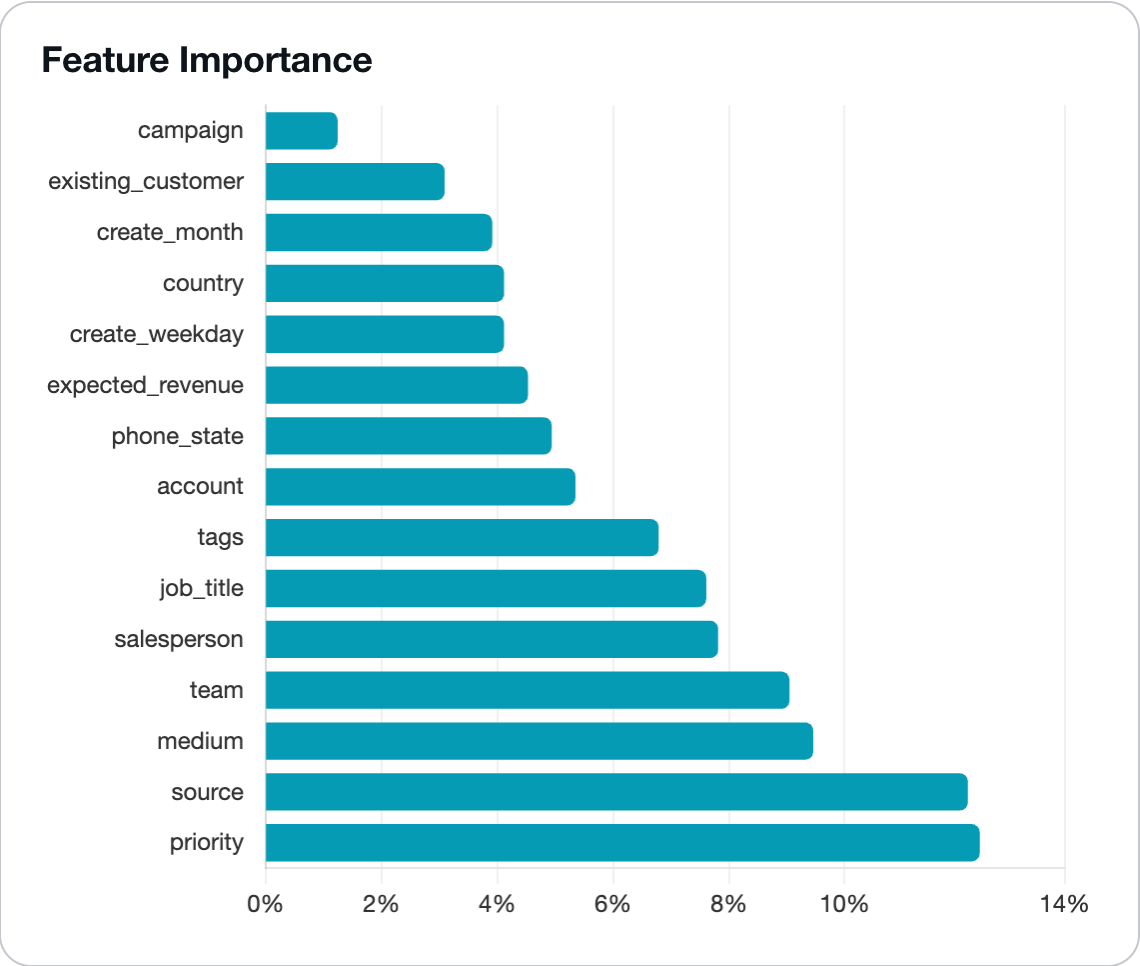
EasyDeploy AI shows which fields a model leaned on. Ours leaned most on priority, which Odoo's default score doesn't use. Adding priority and salesperson to Odoo's fields made its ranking worse, from 77 to 73 in 100. Odoo counts each field on its own, so it can't tell that one salesperson rates almost every lead highly. A model that looks at fields together can pick that up.
How do you test Odoo's score on your own leads?
Odoo keeps no history of its scores. `probability` and `automated_probability` aren't tracked in the chatter, and closing a lead overwrites the score with 100 or 0. So you either backtest from a cut-off date, or save scores going forward.
You need two connectors in your assistant, one that reads Odoo and one that trains models. For Odoo 10 to 19 we used the Odoo Tools plugin by Transgenia, which is free and open source and has a read-only mode. Odoo 20 adds its own MCP server. On Odoo Online, you need the Custom plan to use the external API. Self-hosted Odoo includes it. For training, connect EasyDeploy AI.
- Make a dedicated Odoo user with access to CRM and every company you sell from, and run the connector in its read-only mode. On Enterprise and Odoo Online that's a paid internal user. Create an API key for that user and use it to connect your assistant.
- Set Odoo's start date in CRM, Configuration, Settings, and run Update Probabilities. On a fresh install the start date is a week before you installed, so the score has almost nothing to learn from.
- Ask for the history. "Export my won and lost leads created since January 2024, including archived ones, with only the fields Odoo knows when a lead is created." Lost leads are archived in Odoo, so without archived records you get only the wins.
- Check what it left out. Anything Odoo fills in later has to go: stage, probability, Odoo's own score, the close and conversion dates, the lost reason, the archived flag and the lead or opportunity type. If those stay in, the model just reads the outcome off the lead. Odoo also keeps the current value of a field, not the value at creation, so a priority or tag edited mid-deal can leak the outcome too.
- Backtest today. Pick a cut-off date, say six months ago. Ask the assistant to rebuild Odoo's score from the leads closed before it, which works because Odoo's method is a simple published formula, and to train the model on the same leads. Then compare both on the leads created after the cut-off. Our rebuild of Odoo's formula landed within 0.01 AUC of Odoo's own saved scores (0.764 vs 0.767).
- Confirm going forward. Every Monday, have the assistant save last week's new leads to a sheet with both scores: the model's, and Odoo's `automated_probability`, not the Probability a salesperson can edit. Don't change Odoo's scoring fields meanwhile, because that recomputes its scores. Compare when about 100 have been won. For a team closing 15 deals a month that's about seven months, so start now.
Two more checks before you trust the result
Ask the assistant how well each field predicts on its own, and question any that stands out.
Check that tags came through whole. One export path we tried kept only the last tag on each lead.
The readiness guide covers the rest in a few minutes.
Can you add AI lead scoring to Odoo without a custom module?
Yes, and that's why we built the test this way. Ask anyone who has run Odoo for a few years what hurts, and you'll hear about upgrades. Custom modules need migrating to each new version, and somebody bills for it. A custom scoring module on the lead model would be one more to migrate.
Inside Odoo
Odoo 19
Your scoring module
custom code on the lead model
upgrade
Odoo 20
Your scoring module
migrate, retest, pay again
Beside Odoo
Odoo 19
Community: free and open source, nothing added
upgrade
Odoo 20
nothing to migrate
free, open-source connector, signed in as a read-only user
Your AI assistant
Claude, ChatGPT, Gemini or Copilot, asked in plain English
trains and scores, no code
Your lead model
in EasyDeploy AI's free tier, the same model before and after
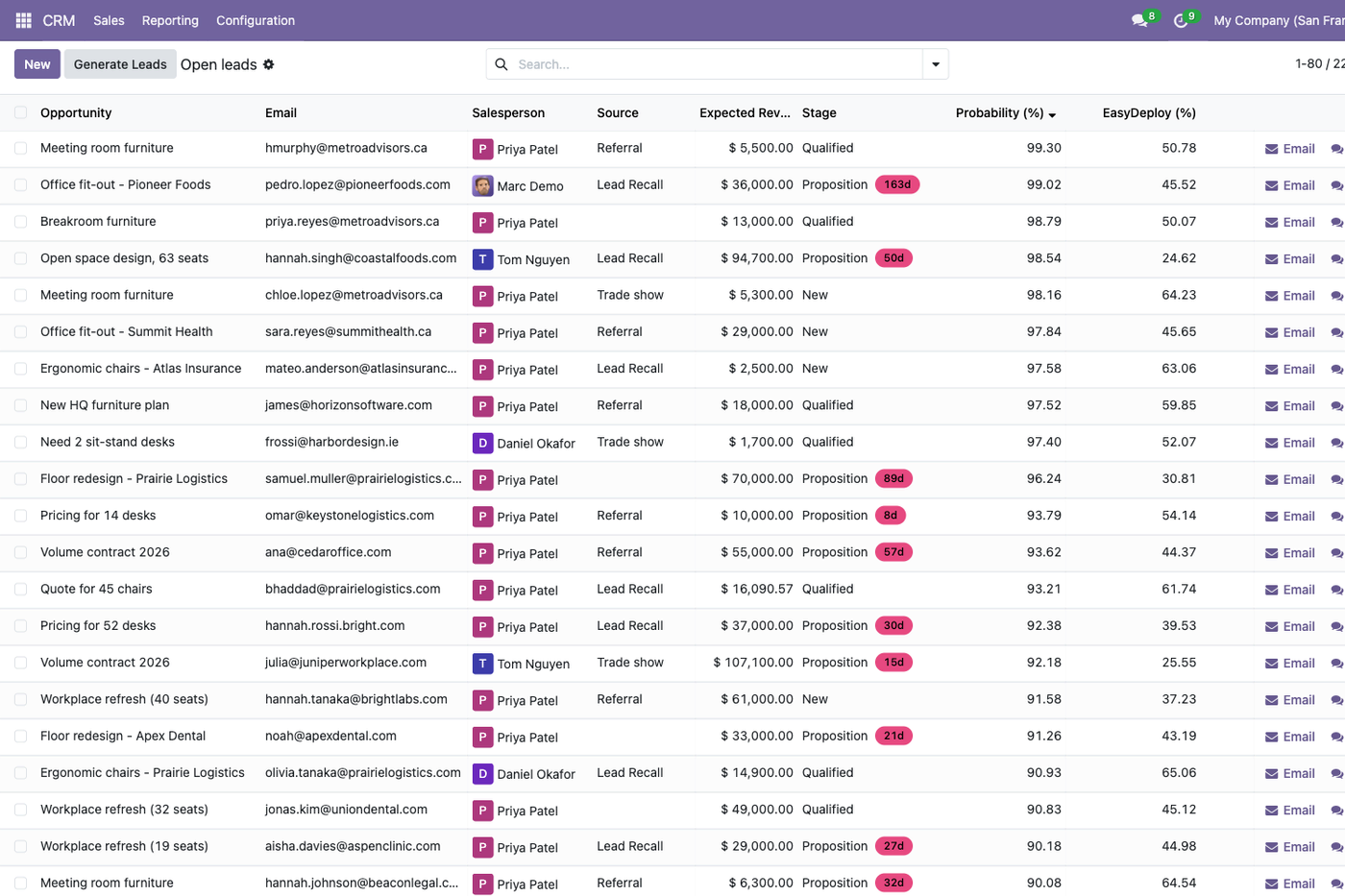
If sales should see the score where they work, write it back to a custom field, so it sits next to Odoo's in the pipeline. That's data, not code, so there's still nothing to migrate. The two columns in the picture at the top of this post aren't measuring the same moment. Odoo's score rises as a deal moves through its stages, and the top rows are all at Qualified or Proposition. Ours is each lead's score when it was created. The fair comparison is the table above.
How we added the EasyDeploy column
- Turn on developer mode and add a custom field to leads under Settings, Technical, Database Structure, Fields.
- Add a column for it in the pipeline list. That column is a small custom view, so check that it still shows after an upgrade.
- Ask the assistant to run a batch prediction and write the scores into the field, with a user that's allowed to write.
As for upgrades, the connector is the one part that has to keep up with Odoo. Odoo's API docs say the old XML-RPC and JSON-RPC endpoints will be removed in Odoo 22, or 21.1 on Odoo Online. Their replacement is the JSON-2 API that arrived in Odoo 19. So check that yours supports JSON-2.
How do you get started with EasyDeploy AI?
- Connect EasyDeploy AI to your assistant from the connector page. It takes about two minutes, and the free tier includes five training runs and 100,000 predictions. No credit card needed.
- Train on your closed leads, then save scores for new ones, as in the test above.
- If you haven't trained a model from a chat before, this guide walks through a first one.
Frequently asked questions
How does Odoo predictive lead scoring work?
Odoo predictive lead scoring uses naive Bayes. It takes the won and lost leads created since a start date you set, counts how often each field value appears among the won and the lost, and multiplies those odds into a probability. Stage and sales team are always included, with separate counts for each team. By default it also uses state, country, phone and email quality, source, language and tags. The score is stored as the automated probability. The Probability shown on the lead follows it until a salesperson edits it.
Is Odoo predictive lead scoring only in Enterprise?
No. Predictive Lead Scoring is part of the CRM app in Odoo Community, which is free and open source under the LGPL, so it works without an Enterprise subscription. Its settings are under CRM, Configuration, Settings. On a new database, set the start date and run Update Probabilities, because the default start date leaves it almost nothing to learn from.
Which fields should I use in Odoo predictive lead scoring?
Start with the defaults and add fields one at a time, checking each change on leads the score has not seen. In one simulated test, dropping language and adding medium, campaign, salesperson, priority and customer lowered the overall ranking from 0.77 to 0.73 AUC. It did catch more wins at the very top of the list. A model trained on the same fields with a self-serve platform such as EasyDeploy AI reached 0.83 on that data.
How do I add AI lead scoring to Odoo without a custom module?
Keep the model outside Odoo. Connect Odoo to an AI assistant such as Claude or ChatGPT through a read-only user, and connect a model-training service such as EasyDeploy AI. Then ask the assistant, in plain English, to train on your won and lost leads, archived ones included, and to score new ones. Open-source connectors such as Odoo Tools are free, EasyDeploy AI has a free tier, and you write no code. Nothing is installed in Odoo, so there's no module to migrate at the next upgrade. You can keep the scores in a spreadsheet, or write them back through the API with a user that's allowed to write.
Can I connect Claude or ChatGPT to Odoo?
Yes. Claude and ChatGPT can connect to Odoo through an MCP connector. For Odoo 10 to 19, free open-source connectors such as Odoo Tools by Transgenia work through Odoo's external API, and Odoo 20 adds its own MCP server. On Odoo Online, external API access needs the Custom plan. Use a dedicated user with only the access the assistant needs, and start in read-only mode. Pair it with a model-training connector such as EasyDeploy AI when you want predictions rather than lookups.
Will an Odoo upgrade break my lead scoring?
Odoo's built-in score is part of Odoo, so it's upgraded along with Odoo. Custom scoring modules usually need migrating with each major version, like any other customization. A model kept outside Odoo, for example in EasyDeploy AI, depends only on reading the leads, so an upgrade affects the connector rather than your model. Odoo plans to remove the old XML-RPC and JSON-RPC endpoints in Odoo 22 (21.1 on Odoo Online), so check that your connector supports the JSON-2 API.

Written by
Emanuel Castañeda
Founder & Chief Executive Officer
Emanuel started EasyDeploy AI after a decade of building the kind of prediction infrastructure only large companies could afford. At Audible he worked on the machine learning behind the recommendations that decide what millions of listeners hear next. Before that he wrote foreign-exchange trading software at BlackRock. In both places the pattern was the same: a team of specialists, a platform built from scratch, and a budget that put the whole capability out of reach of anyone smaller.
More about EmanuelReady to try it on your data?
Book a strategy demo for a walkthrough scoped to your systems, or start free and train a custom model yourself. No credit card required.