
Predictive Analytics for Small Businesses: What You Can Actually Do With Your Data
By Emanuel Castañeda, Founder & CEO
October 12, 2026
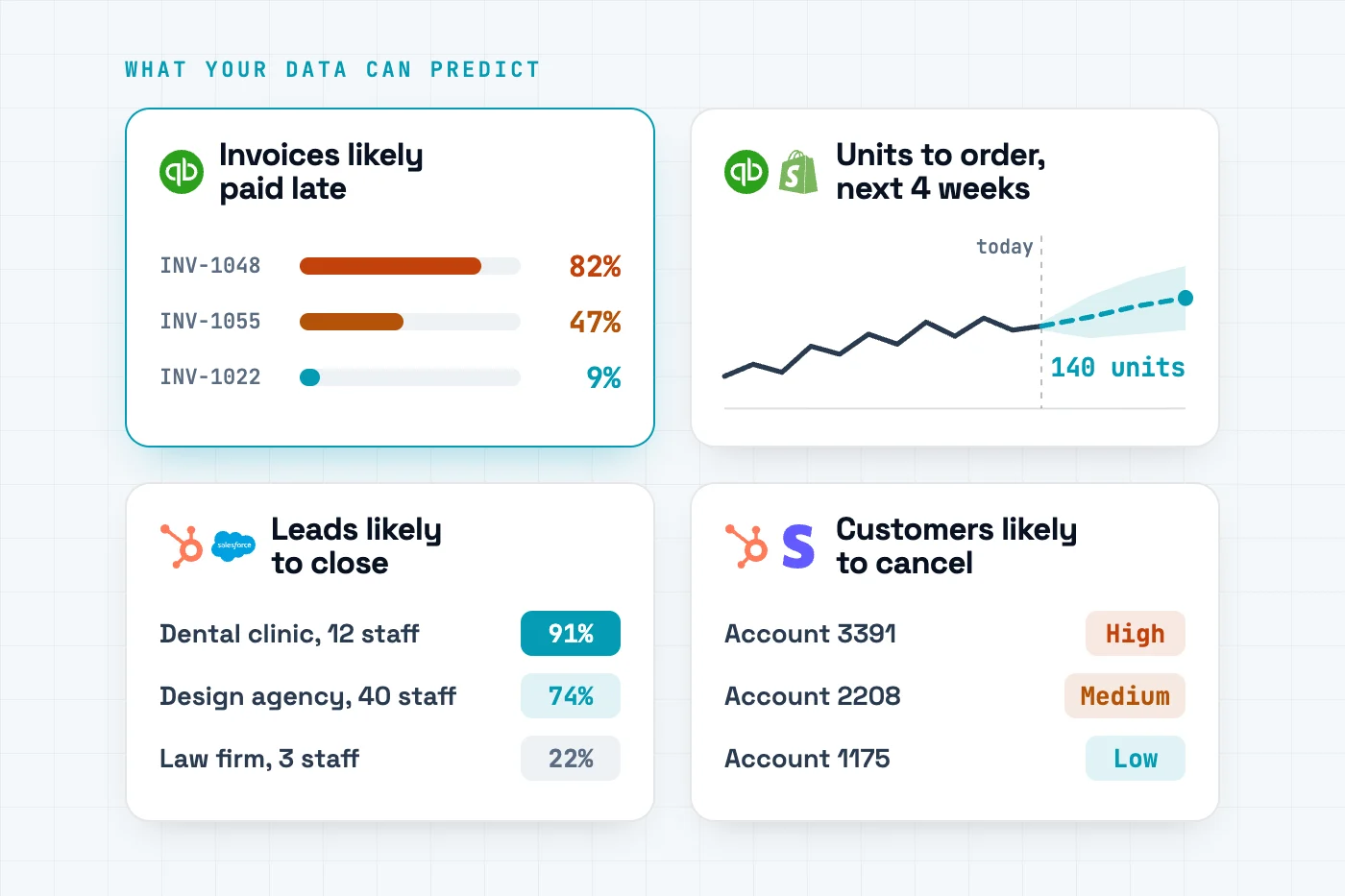
If your business has a year or two of history in QuickBooks, Shopify, HubSpot or Salesforce, you can predict which invoices will be paid late, what each product will sell, which leads will close and which customers will leave. You need a few hundred past cases with the outcome recorded, not a data team.
TL;DR
Your QuickBooks, Shopify or CRM history is an answer key. It already records which invoices paid late, what sold, which leads closed and who left, and a model learns from it to predict the next ones.
Your history already records
A model learns to predict

Which paid invoices came in late
The chance each open invoice pays late
Collections calls the riskiest first

What each product sold, week by week
Units per product over the next 4 weeks
Reorder before the shelf empties


Which leads and deals you won or lost
The chance each new lead closes
Sales works the list from the top

Which customers cancelled
Churn risk for every current customer
Retention calls before they decide
- Each prediction needs past cases with the outcome recorded. A few hundred is enough to start.
- Your data gets in through a CSV export or the connector your AI assistant already has. There is no integration to build.
- Self-serve platforms such as EasyDeploy AI train on your own rows without a data team, and its free tier covers five training runs.
Where I am coming from
We make EasyDeploy AI, one of the four platforms compared below. The facts about the other three come from their own websites. Where an answer mentions Claude, the same works in ChatGPT, Gemini, Copilot or any assistant that supports MCP connectors.
What is predictive analytics for a small business?
Predictive analytics means training a model on past records where you already know the outcome, then using it to score the records where you do not know it yet. The invoices you have been paid for teach it which open invoices will be paid late. Last year's orders teach it what will sell next month. Every closed deal, won or lost, teaches it which new leads are worth a call. The output is a number for each record, such as a probability or a forecast, that you can sort and act on. That makes it different from a dashboard, which reports what already happened, and from asking a chatbot, which gives a reasoned guess that can change each time you ask.
Can I use my QuickBooks history to predict which invoices will be paid late?
Yes. QuickBooks records, for every invoice you have been paid, the customer, the amount, the terms and the day the money arrived, which is what a model needs to learn who pays late. Intuit's 2026 Small Business Late Payments Report found 59% of businesses have invoices overdue by 30 days or more, up from 47% a year earlier.
Train on paid invoices with "paid late" as the outcome, using only what was known when each invoice went out: the customer's payment record so far, the amount, the terms and the month. Leave out the payment date, which only exists afterwards. Then score the open invoices. Each one gets a probability of paying late, so collections starts with the riskiest balance. Your AI assistant can read the invoices through its QuickBooks connector, or you can export a CSV. A model-training platform such as EasyDeploy AI then trains, tests and scores, and its QuickBooks scoring skill turns the scores into a call list.
Can I forecast demand from my order history in QuickBooks or Shopify?
Yes, per product and per week. Group your orders into one row per product per week, add what was known going into each week, such as units sold in the previous four weeks and in the same weeks last year, and use units sold over the next four weeks as the target. A year of history is the minimum and two years is better, so the model sees every season twice.
Test the forecast on your most recent weeks against simply repeating last month, and act on it only if it wins. On the public Online Retail II order history of 1,088 products, a 4-week forecast trained on EasyDeploy AI was 52.7% accurate against 47.0% for repeating last month. Your assistant can do the reshaping through its QuickBooks or Shopify connector, or you can export the orders as a CSV. QuickBooks' own Forecasts project income and expenses, not units per product. The step-by-step guide walks through it.
How do I score leads automatically from my HubSpot or Salesforce history?
Train a model on the leads whose outcome you already know. Export contacts or opportunities with a column for whether each became a customer, keep only the fields that were known when the lead arrived, and train on that outcome. The model scores each new lead by how closely it resembles the ones you won, so reps work the list from the top. For deals already in the pipeline, train on closed opportunities, won against lost, using only fields filled in while each deal was open.
A fitted model beats typed-in points. In our test on 9,240 public leads a model trained on EasyDeploy AI's free tier put 92 converters in its top 100, against 74 for a hand-built two-axis score and 39 for calling at random. HubSpot's built-in scoring needs a Professional or Enterprise plan, and its AI recommendations are Enterprise only. Scores can go back into the CRM through its API or a connected assistant.
Can a small business predict customer churn without a data scientist?
Yes. Export your customers with a column marking who left, pick that column as the outcome, and a self-serve platform trains and tests the model with no code. Each row should describe a customer as of one date, plus whether they cancelled in the window after it, for example 90 days, with nothing filled in after that date. A few hundred customers with the outcome recorded is enough to start.
Judge the model by how many real churners it catches, not by its accuracy. On the public IBM Telco dataset of 7,043 customers, the first model trained on EasyDeploy AI was about 80% accurate and still missed 48% of the customers who left. Rebalancing the training data cut the misses to 17% on the same untouched holdout. The output is every current customer ranked by churn risk, with a report of which fields drive it, ready for whoever makes the retention calls.
Can I use Claude or ChatGPT to make predictions from my business data?
Yes, once you give the assistant a trained model to run. On its own, Claude or ChatGPT reads your rows and gives a reasoned guess that can change each time you ask, and nothing is kept for the next chat. Connected to a model-training service over the Model Context Protocol (MCP), the assistant pulls the data through its QuickBooks, Shopify, HubSpot or Salesforce connector, prepares it, trains a model, tests it on rows it never saw and scores new records, all in one conversation.
The model stays in your account, so it keeps scoring after the chat ends, from a script, a form or next week's chat. EasyDeploy AI is one such service: its MCP connector is open source and works in Claude, ChatGPT, Claude Code, Cursor, VS Code and other clients that support remote MCP servers. Connecting it takes about two minutes, and the Claude connector guide shows each step.
What else can a small business predict from its own data?
Anything you already record an outcome for. If a column in your history says what happened, such as renewed or not, paid on time or not, or how many units shipped, a model can learn to predict it for the records where it has not happened yet. Common next models: which customers will buy a second product, which campaigns will convert before you commit the budget, which jobs will run late, and which orders will come back as returns.
The rule is the same each time: a few hundred past cases with the outcome filled in, and only fields that were known before the outcome. The data readiness guide checks your export in a few minutes. Platforms such as EasyDeploy AI train on any labeled column you choose rather than a fixed menu of templates.
Supported integrations: which systems does EasyDeploy AI work with?
EasyDeploy AI does not need its own connector for each system. Your data reaches it through the connector your AI assistant already has, working alongside the EasyDeploy MCP connector, or as a CSV export from any tool. For the systems small businesses ask about most, that looks like this.
| System | Through your AI assistant | Or export a CSV of | First models to try |
|---|---|---|---|
| QuickBooks | Intuit's QuickBooks connector in Claude | Invoice, payment or sales by product reports | Late-paying invoices, demand per product |
| Shopify | The Shopify connector in Claude | Orders or customers, from the Shopify admin | Demand per product, repeat customers |
| HubSpot | The HubSpot connector in Claude | Contacts, companies or deals | Lead conversion, deals that close, churn |
| Salesforce | The Salesforce connector in Claude | A leads, opportunities or accounts report | Lead conversion, deals that close, renewals |
- Claude, ChatGPT and other MCP clients. The open-source EasyDeploy connector lets the assistant upload a dataset, train, test and score from the chat. It works in Claude, ChatGPT, Claude Code, Cursor, VS Code and any client that supports remote MCP servers.
- Your own software. The REST API trains models and scores records with an API key, one at a time or in batches, for a system that needs predictions without anyone opening a chat.
How does EasyDeploy AI compare with DataRobot, Akkio and Pecan AI?
All four train predictive models on your own data. What separates them is who they are built for and what it takes to get a first model.
| Platform | Built for | Requires a data team | Free tier | Trains on your own data | No-code interface |
|---|---|---|---|---|---|
| EasyDeploy AI | Small teams with an export or an AI assistant | No | Yes: 5 training runs and 100,000 predictions, no credit card | Yes, from a CSV or through your assistant | Yes: a web app, or plain English in your assistant |
| DataRobot | Enterprises with AI and data science teams | Usually | No; a 30-day free trial | Yes | Low-code: a visual interface alongside code |
| Akkio | Media agencies and data providers | No | No; custom pricing through sales | Yes | Yes, including no-code modeling |
| Pecan AI | Analysts with a data warehouse who want vendor help | A data specialist, guided by Pecan's team | No; pricing through sales | Yes, from your warehouse | Partly: an AI agent writes the SQL |
Where another tool is the better pick. If your data lives in Snowflake, BigQuery or Databricks and must stay there, and you want a vendor team on regular calls, look at Pecan AI. If you have a data science team and governance requirements, DataRobot is built for you. If you run a media agency, Akkio is. EasyDeploy AI is for the team with an export, no data scientist, and a decision it wants a model for this week. The table draws on DataRobot's trial page, Akkio's pricing page and Pecan AI's pricing page.
How do you get started with EasyDeploy AI?
- Pick one decision. Late invoices, next month's orders, which leads to call or who might cancel. Start with the one someone on your team would act on this week.
- Check your data. You need past cases with the outcome recorded. The readiness guide takes a few minutes.
- Connect or export. Add the EasyDeploy connector to Claude, ChatGPT or another MCP client alongside your QuickBooks, Shopify, HubSpot or Salesforce connector. Or export a CSV and upload it in the app.
- Train and test. Ask your assistant for a model, or pick the outcome column in the app. Judge it on rows it never saw, against what you do today.
- Use the scores. Download the ranked list, or score new records from the chat or through the API.
Create a free account, or book a demo if you would like help with your first model.
Frequently asked questions
How much data does a small business need for predictive analytics?
Less than most people expect. A few hundred past cases with the outcome recorded is enough for a first model, and a few thousand is comfortable. Demand forecasting needs time more than rows: at least a year of weekly sales per product, ideally two. What matters more than volume is that both outcomes appear often enough to learn from and that no column was filled in after the outcome. A platform such as EasyDeploy AI reports whether your rows were enough before you rely on the model.
Is there free predictive analytics software for small businesses?
Yes. EasyDeploy AI has a free tier with five training runs and 100,000 predictions and no credit card, enough to test a model on your own data before paying anything. DataRobot offers a 30-day trial rather than a free tier, and Akkio and Pecan AI quote prices through sales. Open-source libraries such as scikit-learn are free as well, but they need someone who writes Python.
What are the best no-code predictive analytics tools for small businesses?
It depends on who will run it. A team with an export and no data scientist wants a self-serve platform with a free tier, such as EasyDeploy AI, that trains on that export or from inside an AI assistant. Akkio offers no-code modeling but is now built for media agencies. Pecan AI suits analysts with a data warehouse who want a vendor team guiding setup. DataRobot fits enterprises with a data science team. The comparison table on this page lines them up.

Written by
Emanuel Castañeda
Founder & Chief Executive Officer
Emanuel started EasyDeploy AI after a decade of building the kind of prediction infrastructure only large companies could afford. At Audible he worked on the machine learning behind the recommendations that decide what millions of listeners hear next. Before that he wrote foreign-exchange trading software at BlackRock. In both places the pattern was the same: a team of specialists, a platform built from scratch, and a budget that put the whole capability out of reach of anyone smaller.
More about EmanuelReady to try it on your data?
Book a strategy demo for a walkthrough scoped to your systems, or start free and train a custom model yourself. No credit card required.